Embed Playlists
Embed playlists directly to your platform for a seamless experience
Embed video playlists in your product, website, or LMS so viewers can enjoy a continuous, curated sequence of videos without leaving your experience.
Here is a step-by-step guide to setting up a playlist on your platform:
-
Navigate to Video → Playlists and create a new playlist if you don’t already have one.
-
Add videos to your playlist.
-
Click on the three dots and copy the embed code.
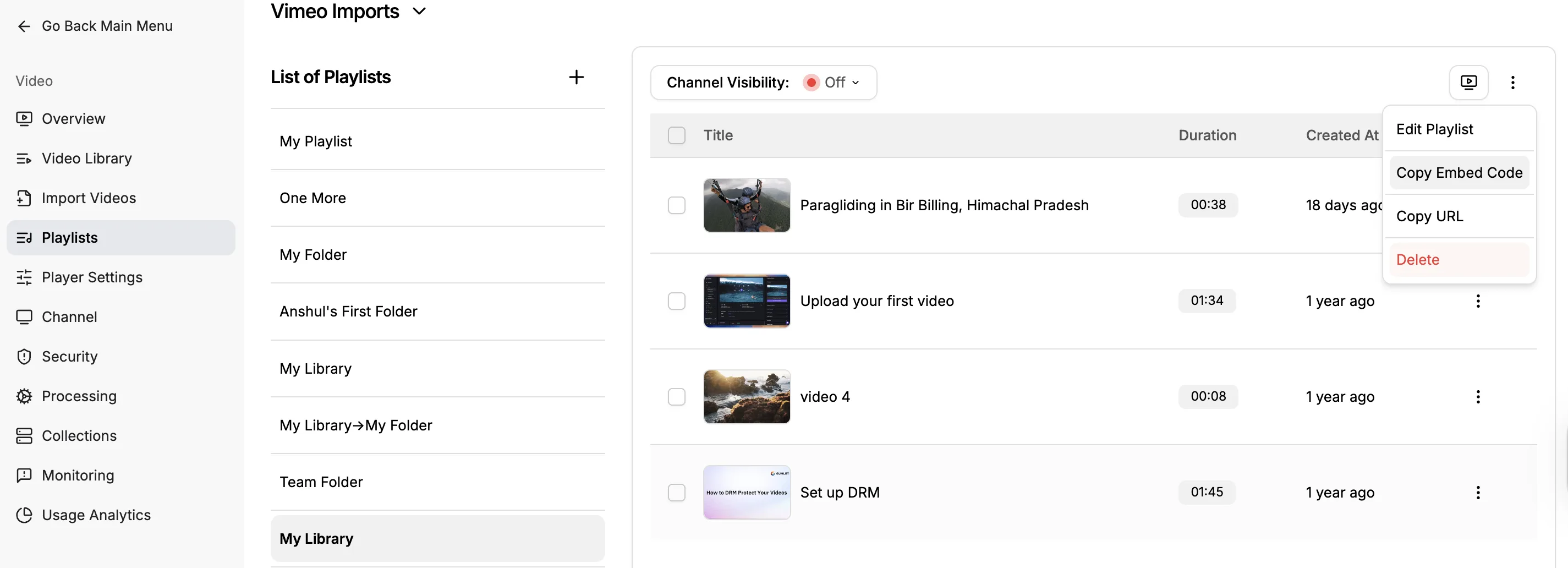
-
Paste the code directly into your website, or add it to an HTML block if you are using a CMS, LMS, etc.
-
Publish or share the page with your audience so they can continuously watch videos directly on your website.
Sample Playlist Embed Code
<style>
      .gumlet-playlist-embed {
        position: relative;
        aspect-ratio: 80 / 31;
      }

      @media (max-width: 767px) {
        .gumlet-playlist-embed {
          position: relative;
          aspect-ratio: 16 / 9;
        }
      }
    </style>
    <div class="gumlet-playlist-embed">
      <iframe
        loading="lazy"
        title="Gumlet Video Tutorial"
        src="https://play.gumlet.io/embed/playlist/674b4622dad6bb7514c68f13"
        style="border:none; position:absolute; top:0; left:0; height:100%; width:100%;"
        referrerpolicy="origin"
        allow="accelerometer; gyroscope; autoplay; encrypted-media; picture-in-picture; fullscreen;">
      </iframe>
    </div>
Your playlist embed will use the same settings as your player in the video library. Any changes you make there will be applied here automatically.