How to disable signed URL?
A step-by-step guide to disable signed URL
Suppose you have enabled the signed URL and use embed code without any additional code implementation, your videos are likely to be impacted.
If you have enabled it mistakenly or are not aware of how it works, you should disable it immediately. We will release an update on March 1st, 2025, that will force this setting for signed-URL-enabled workspaces. Your videos will stop playing if you do not disable this.
What is a signed URL?
The signed URL is a secret URL generated for time-bound video viewing. If the expiry time has passed, the video will stop playing and your audience may see the impact. Learn more about signed URLs here.
How to disable signed URLs?
- Go to Video Library and click on
Securitytab. - If the signed URL is enabled, disable it.
- Save the settings.
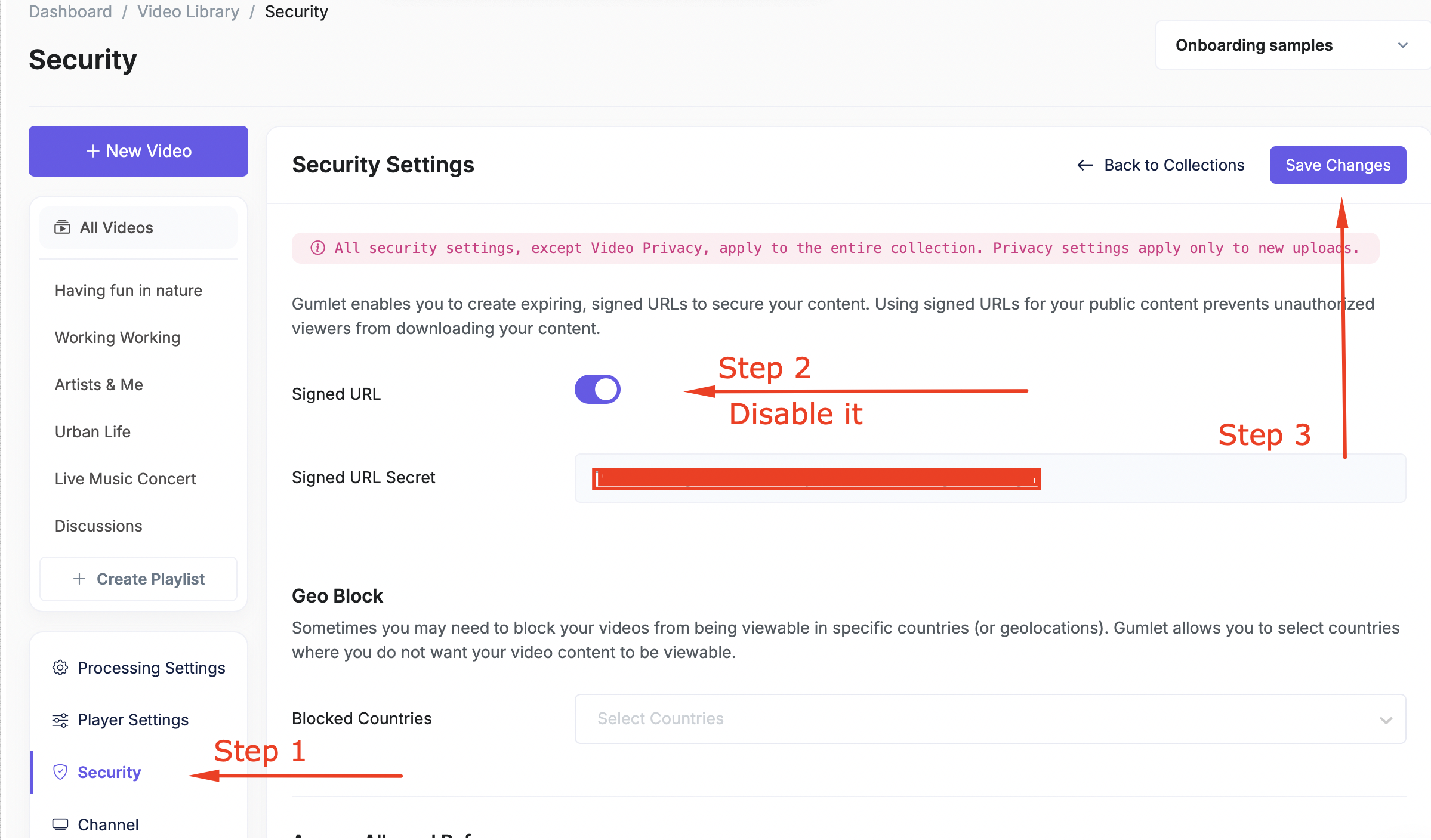
Note: If you have multiple workspaces, check and disable this setting inside all workspaces.
You can switch workspaces from the top-right dropdown in the video library.
If you have any queries, feel free to chat.

