How to change privacy for videos?
A step-by-step guide to change video privacy
Suppose you have privacy set to private and use embed code on your website or app, your videos are likely to be impacted.
If you have enabled it mistakenly or are unaware of how it works, you should change it immediately. We will release an update on March 12th, 2025, that will force this setting for private videos. Your videos will stop playing if you do not change this.
What is a private video?
The private videos do not play outside the dashboard and private video channels. You can create a member-only channel and mark your videos private to secure your content from playing outside your channels. Learn more about video privacy here.
How to change privacy settings?
- Go to Video Library and click on
Securitytab. - Change the privacy setting, and check the checkbox below to change it for all videos in the workspace.
- Save the settings.
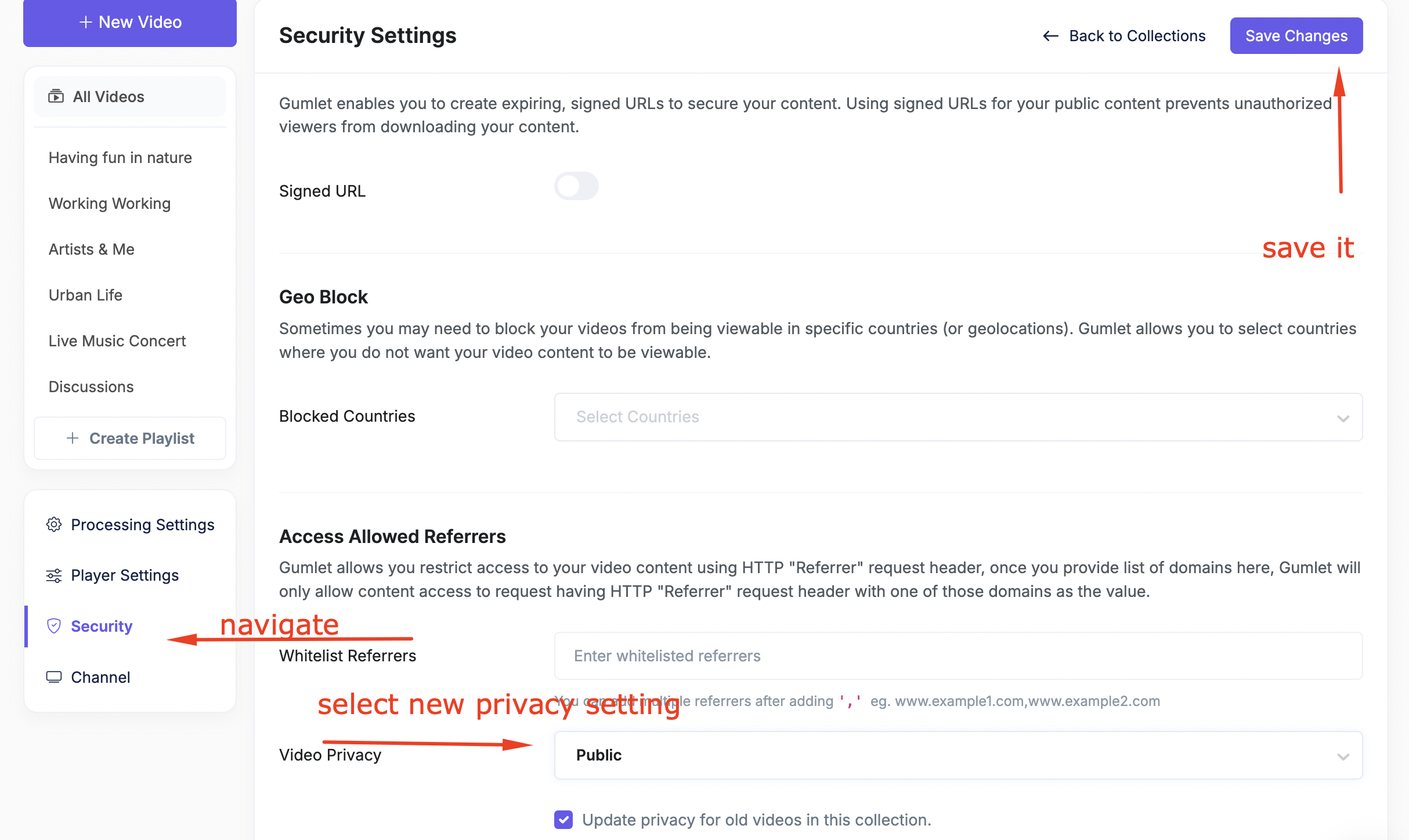
Note: If you have multiple workspaces, check and disable this setting inside all workspaces.
You can switch workspaces from the top-right dropdown in the video library.
If you do not want to change it for all videos, change it by going to video settings for a specific video.
If you have any queries, feel free to chat.

